


Import from GEO5 programs
Fin EC programs provide the option to import elements from GEO5 programs. This feature is particularly useful when it is necessary to design a structural element (e.g., a concrete beam in GEO5 FEM), display more detailed design results, or modify inputs or calculation parameters due to non-standard conditions. The import transfers the geometric and material characteristics of the element (cross-section, length, reinforcement) and the internal forces.
Data can be loaded from the following GEO5 programs:
- Sheeting Design, Sheeting Check - in the "Dimensioning" section of the program, it is possible to export the geometry and material of the sheeting structure as well as the internal forces acting on it. This data can be imported into the "Fin EC" program as a "Member" task. Internal forces are normally related to 1 running meter of the structure. Only in cases where the main elements of the sheeting structure have a specified axial distance (e.g., steel I-sections) , the internal forces are multiplied by this distance. The forces can thus be used directly for the design without the need for additional recalculation.
- Beam - in the "Analysis" section, the program allows to export the geometry and material of the beam, as well as the bending moment and shear force diagrams. The data can be loaded as a "Member" or "Beam" task.
- Pile - in the "Horizontal capacity" section, it is possible to export the pile geometry, including bending moment and shear force diagrams. The pile is imported into "Fin EC" programs as a "Member" task.
- Cantilever wall, Gravity wall, Masonry wall, Abutment - concrete sections from the "Dimensioning" part can be transferred to "Fin EC" programs as a "Section" tasks.
- FEM - in the "Analysis" part, it is possible to export all beams including the corresponding internal force curves.
The data can be loaded into any dimensioning program ("Concrete", "Concrete Beam", "Concrete Fire", "Steel", "Steel Fire", "Timber", "Timber Fire").
Export from GEO5 programs
Data can be exported from "GEO5" programs using the "Export FIN EC" button. In programs with more extensive export options, this command is available by pressing the " " button.
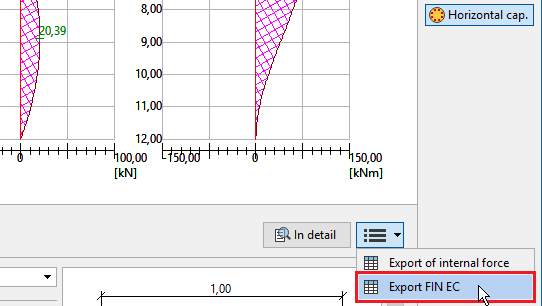 Data export from "Pile" program
Export is always performed only for the current phase.
Import into Fin EC programs
Data from GEO5 programs can be imported into Fin EC programs using the "Insert GEO5 data into a new task" command, which is located in the main menu in the "Edit" section.
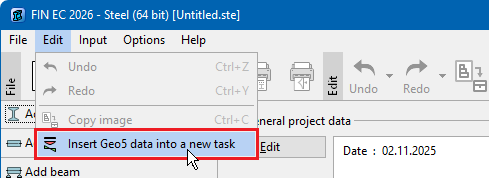 Import into "Steel" program
After loading the data from the clipboard, the program displays a summary of the import with the basic characteristics of the imported element. During import, the program checks whether the characteristics comply with the program's calculation methods. If not, the characteristic is not transferred and must be re-entered after the import. The most common causes are:
- the material is defined by a standard that is not supported by Fin EC programs (e.g., B30 concrete)
- the imported element is made of a material that does not correspond to the program into which it is loaded (e.g., a concrete beam loaded into the "Steel" program)
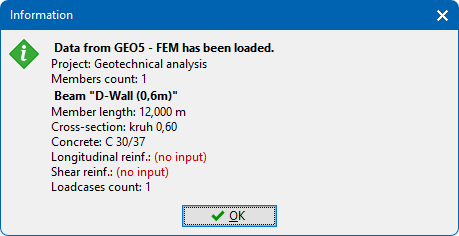 Import summary