


Saw settings
This section contains settings that adjust the cutting list before it is transferred to export files for CNC saws. In this section, you can select the export file type, divide the cutting list between multiple saws, or specify the physical limitations of individual machines.
The cutting list can be processed by a single saw or divided into up to three lists for different machines. For these cases, the settings on this tab are divided into three sections: "Saw1", "Saw2", and "Saw3". If we are using only one saw, we can use any of these three options for these needs. If we combine multiple machines, the program first tries to assign each cut to the "Saw1" list. If the cut does not meet the specified limiting parameters (repeatability, limit angle, etc.), the program checks whether the cut meets the conditions defined in the "Saw2" section. If these criteria are not met either, the cut will be included in the "Saw3" list. For the "Saw3" device, only the output file can be selected; it does not contain any limiting criteria for the geometry of the members. "Saw3" should also be used in cases where we have one CNC saw with geometric restrictions (minimum part length, etc.) and members with unsuitable geometry are cut manually. In these cases, we enter the CNC saw as "Saw1" or "Saw2" and check the "Saw3" item without selecting an output file for it. The program then simply divides the cutting list into two parts and creates only documentation without a control file for the "Saw3" list.
Saw parameters
The following parameters can be defined for individual saws:
Saw name |
|
File formats |
|
Maximum timber length |
|
Minimum timber length |
|
Non-standard cuts |
|
Minimum series factor |
|
Max. count of cuts at the end |
|
Saw type |
|
Shared settings
This section contains additional settings for output formats for CNC saws.
The "Description style for Hundegger" setting allows the user to select how members are to be described in files for these saws (*.bv, *.bvn, and *.bvx). The following options are available:
- Short description - marking of the cut using a unique six-digit identifier. The first two digits in the marking correspond to the first two characters in the project name, the third and fourth characters correspond to the first two characters in the truss name, and the last two digits are reserved for the member number. This description is mainly used in cases where members are described using an integrated printer with a limited number of characters.
- Complete - identical to the manufacturing documentation - a description that corresponds to the method of marking members in the manufacturing documentation. It contains both the number and member code (e.g., "01:TCL").
- Member ID and truss name - lists the member ID, which is always displayed in the first column of the cutting list in the manufacturing documentation.
The "Saw DePauw - tolerance for downholders" setting allows you to adjust the position and pressure of holders in the files for DePauw saws ("DEPAUW" and "CCC"). The default value of the holders position is set to the cross-section depth. Both positive and negative correction values can be entered.
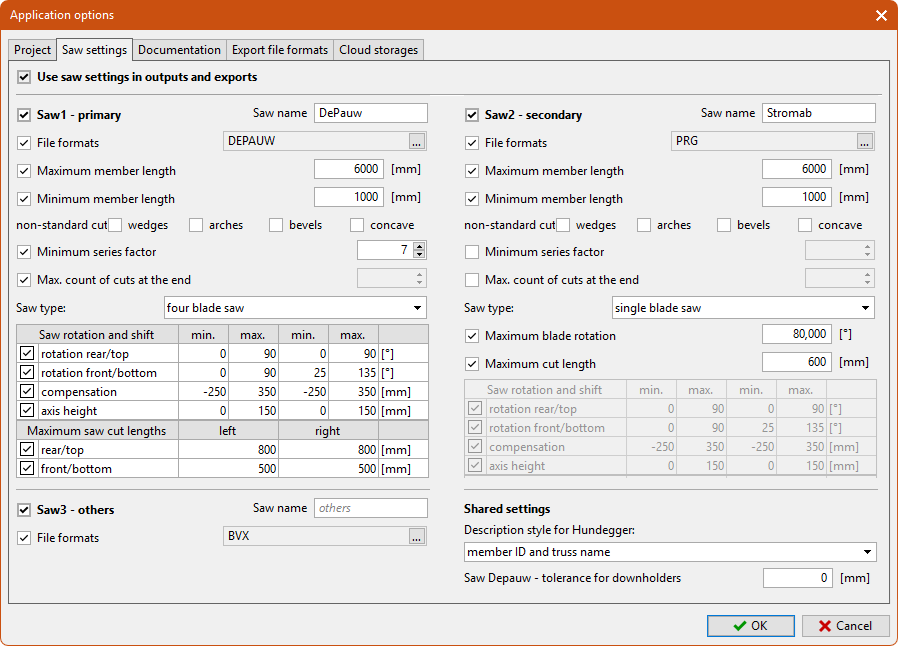 "Saw settings" tab